FAQ
Q1 The colours are all funky and I didn’t take any psychedelic drugs
Section titled “Q1 The colours are all funky and I didn’t take any psychedelic drugs”You are playing Dolby Vision content which is only supported on higher end devices (mostly TVs). I try not to download Dolby Vision content that isn’t compatible with regular HDR displays but sometimes they slip through. Try picking a lower quality setting and if that doesn’t fix it try a different device.
Q2 The brightness is weird, it’s too dark in some spots and too light in others
Section titled “Q2 The brightness is weird, it’s too dark in some spots and too light in others”Your display doesn’t support HDR and HDR content is being played. Jellyfin should do something called tonemapping to make HDR content look good on any display but in rare cases it does not work. Try lowering the quality and if that does not work try a different device.
Q3 The colours are all washed out pastels and I’m not watching a Wes Anderson movie
Section titled “Q3 The colours are all washed out pastels and I’m not watching a Wes Anderson movie”Your display is playing HDR content with a wide colour gamut that it doesn’t support. See Q2 for solution.
Q4 There is no sound
Section titled “Q4 There is no sound”A lot of Blu-Ray content uses an audio format called TrueHD that doesn’t work on all devices. When playing, click the little musical note icon (on Android & PC it’s a musical note anyway) to select an audio track and see if there’s a “downmixed” track. If there is no downmixed track DM me.
Q5 The audio track is dubbed or in the wrong language
Section titled “Q5 The audio track is dubbed or in the wrong language”As in the answer to Q4 see if there is another audio track. Some anime has the dubbed track as the default but should include the original as a secondary audio track.
Q6 When turning on subtitles it just says “Fetching Additional Data”
Section titled “Q6 When turning on subtitles it just says “Fetching Additional Data””Wait 5 minutes and try it again
Q7 No subtitles for foreign languages
Section titled “Q7 No subtitles for foreign languages”There should be a subtitle track called “Forced” that only includes subtitles for foreign languages. Sometimes it is not enabled by default. Use the “CC” button to pick a subtitle track. Rarely this is completely missing, let me know if it is.
Q8 It’s lagging and I’m on GoogleTV/AndroidTV/FireTV
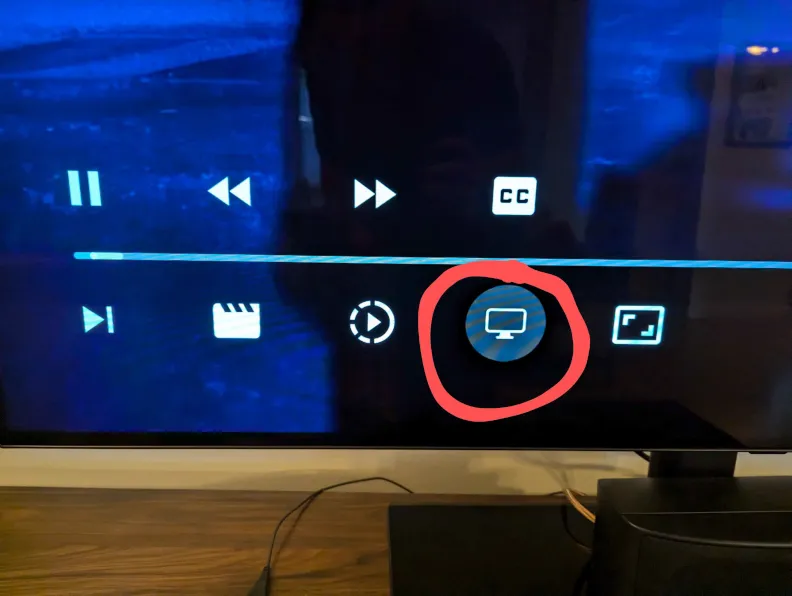
Section titled “Q8 It’s lagging and I’m on GoogleTV/AndroidTV/FireTV”They removed the auto quality switch function for some reason. Select the screen icon near the subtitles button and pick a lower quality.
Q9 Subtitles are out of sync on web/mobile/desktop
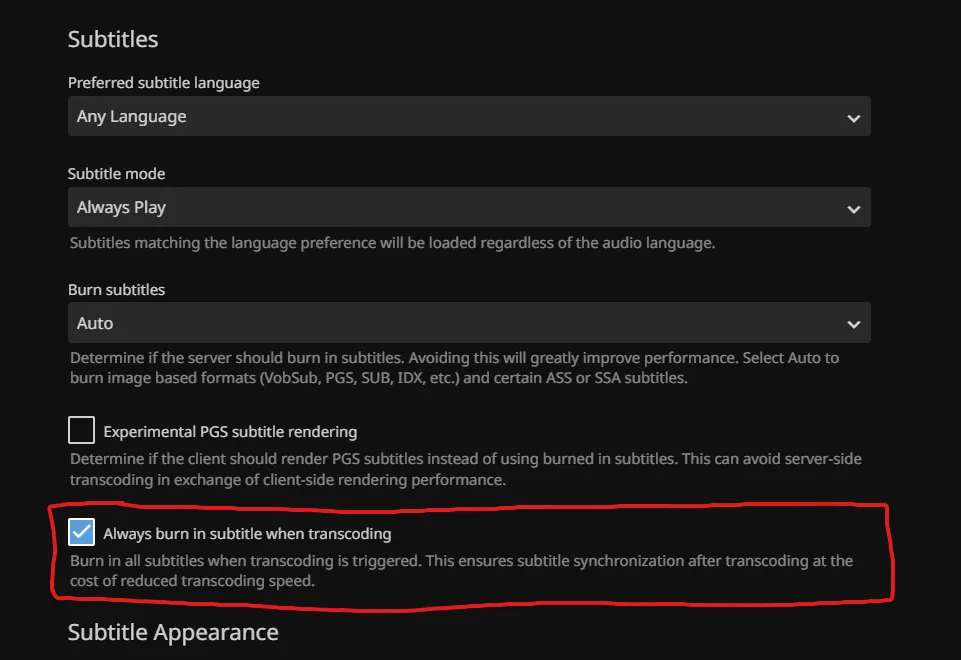
Section titled “Q9 Subtitles are out of sync on web/mobile/desktop”Click the profile icon (the icon in the top-right of the page), click subtitles, and check the option “Always burn in subtitle when transcoding”